Modbus RTU can let a controller address and monitor several compatible EC fans, but the word “EC” does not tell you which communication interface or register map a particular fan has. Begin with the exact model, suffix and controller revision. Then commission the serial network as a system, one device at a time. This order avoids treating a wiring problem as a software problem, or treating a family-level feature as a promise about every fan.
Confirm the selected fan actually supports the required Modbus RTU interface. Match its documented serial settings and register map to the controller, design the RS-485 trunk and its two physical ends, then poll one addressed device before connecting the full network. Keep the model-specific wiring diagram at hand.
Start with the fan and controller documents
LONGWELL offers backward-curved EC fan families, but the interface is configuration-specific. A controlled example, the LWBE3G560-188NT-01 specification, revision A0, identifies a built-in RS-485 option and a separate protocol reference. That demonstrates a model and revision boundary; it does not establish the terminals, register addresses or operating values of a different suffix. For a family-level starting point, see the LONGWELL backward-curved centrifugal fan range, then request the exact specification for the fan under consideration.
Before assigning addresses, collect the fan specification, the matching communication protocol version, the controller manual and the as-built wiring drawing. Record which document controls each decision. The protocol sheet LWRS485-01 V2.0, for example, lists serial format choices and a particular register map. Its values are useful only when that protocol revision is confirmed for the selected hardware and firmware.
Draw the physical RS-485 path before setting software
The common two-wire RS-485 layout is a trunk with devices connected along it. The Modbus Organization’s serial-line implementation guide describes the physical layer and the need to consider the trunk, derivations and line ends. A star of long branches can create reflections and make communication unreliable. Design cable type, route, length, common conductor, screen and protection to the actual equipment instructions and electrical environment. Do not copy a pin label or conductor colour from another model.
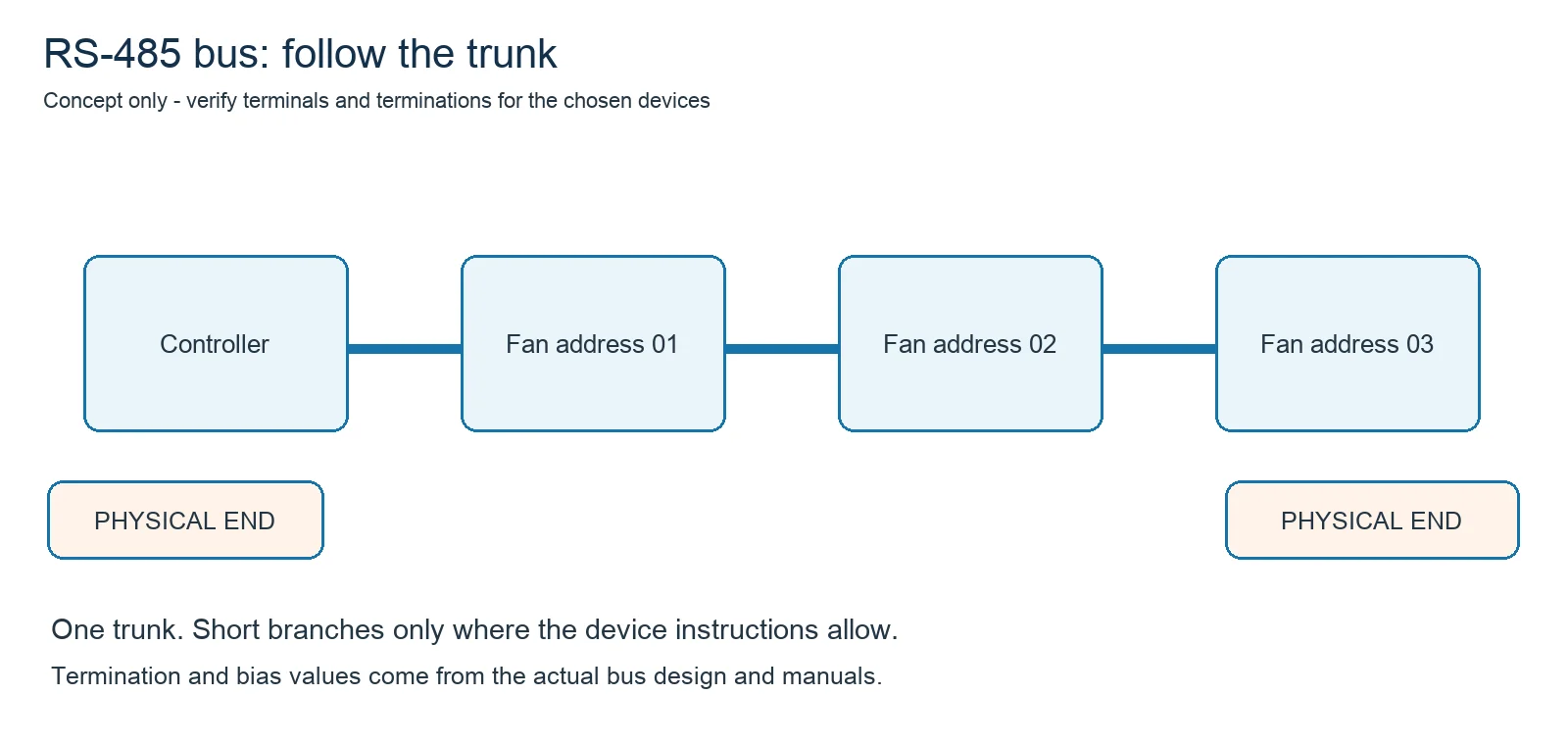
Termination belongs at the appropriate physical ends of a passive line when the bus design requires it, rather than at every fan. The termination value should match the cable and device design. Likewise, biasing and screen bonding must be assigned deliberately; adding them at several undocumented points can worsen a network. An RS-485 interface is a communications path, not a substitute for protective earth or power wiring.
Match serial settings and addresses
Each responding device needs a unique address on its segment. Controller and fans also need compatible baud rate, data bits, parity and stop bits. The LWRS485-01 V2.0 document includes a 9600-baud default and multiple format choices, which is precisely why a general “all Modbus fans use the same settings” rule would be unsafe. Read the installed unit’s current parameters rather than assuming a factory default still applies.
Create an address schedule that maps each physical fan location to its address and exact model. Check one fan’s response before adding the next. If two devices share an address, the master cannot reliably distinguish them. If a fan has a different serial format, it may remain silent even when the wiring is sound. Save the final schedule with the project’s controls records so later service staff can reproduce the configuration.
Use the matching register map, not a generic list
A register address is meaningful only with the corresponding protocol revision, function code, data type and scaling rule. The controlled LWRS485-01 V2.0 document describes, among other items, a target-speed command and readable speed or fault information. That does not mean every LONGWELL EC fan exposes the same values, or that every value has the same engineering unit. Confirm the map supplied for the actual controller before writing a setpoint. Read-only polling is the safer first functional check.
Do not infer airflow, system pressure, energy use or maintenance life from a communication register alone. A speed value is one observation; the installed fan’s operating point depends on the fan curve and the connected system. Where a project needs that decision, compare the exact model’s curve and assembled system resistance rather than using a speed trend as a performance certificate. The LONGWELL control-interface comparison explains when a serial interface may be more useful than a simple analogue command.
Commission one fan, then expand the network
First verify the model and protocol revision. With power isolated as required by the equipment procedure, verify the intended control wiring against the exact terminal drawing. Set the address and serial parameters, then poll one device for an expected read-only value. After that, connect the next device and repeat. Only then move to commanded operation and the full controls sequence. This progression makes it easier to locate a polarity, termination, address or register-map error.
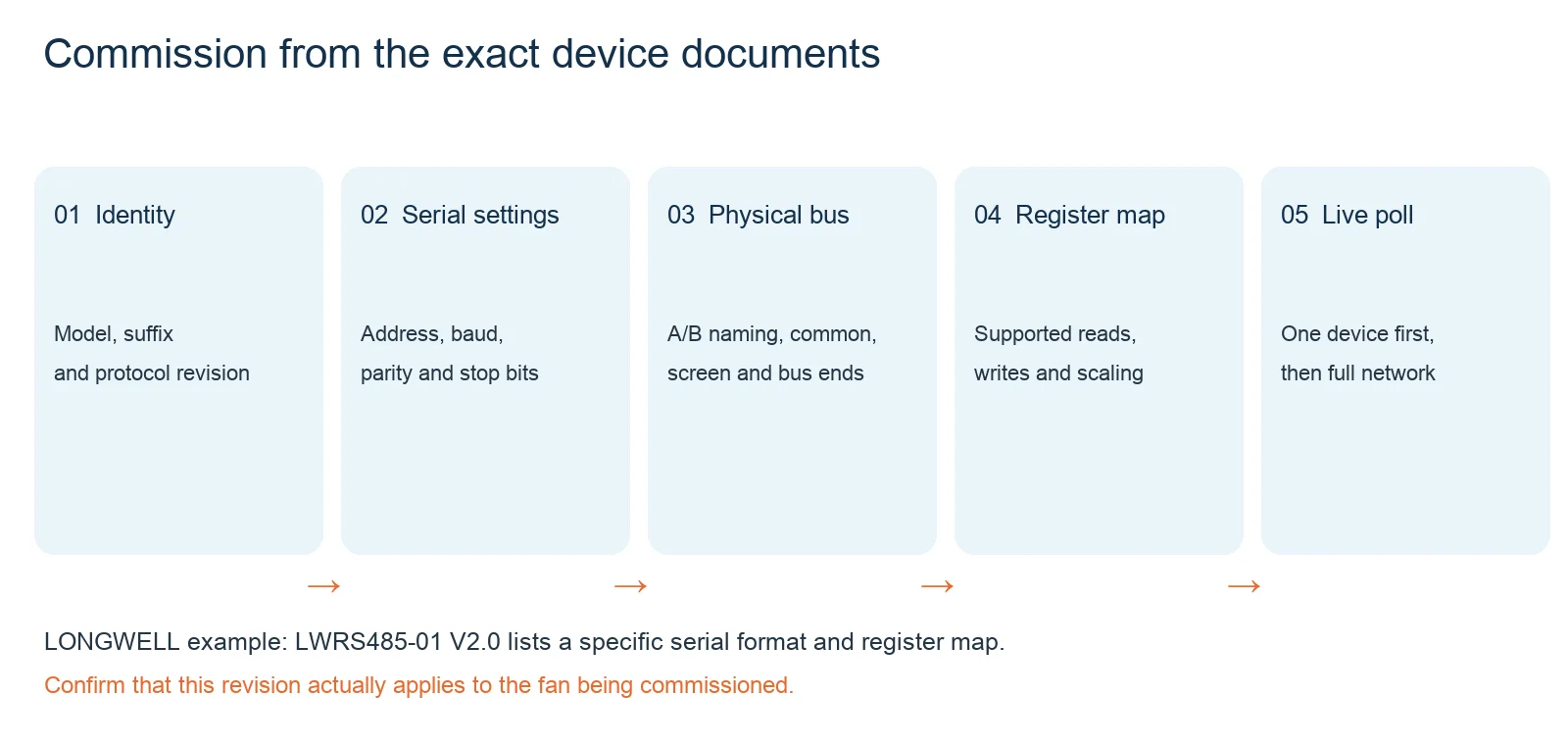
If polling fails, compare the observed fault with a short evidence list: supply and interface status, A/B naming at both ends, cable continuity, physical-end termination, duplicate addresses, serial format, and the command’s function code and register. The Modbus Organization publishes the protocol reference; the fan and controller manuals remain the authority for their own implementation. A mixed-brand bus may be possible at the physical layer, but the controller still needs the correct map and scaling for each participating device.
What to send for a fan-network review
For a useful technical response, send the required airflow and pressure, the proposed fan model and suffix, controller make, number of devices, approximate cable route, supply arrangement and the desired monitoring or command points. Include the exact communication manual revision if you have it. This lets the engineering discussion focus on supported interfaces and the operating point instead of a generic promise that “Modbus works.” For broader remote-monitoring considerations, the LONGWELL smart-fan guide provides the next planning questions.